

Audit log
For admins
The Audit log records the admin and manager actions taken in your organisation, so you can see who changed what and when. It is for org admins.
Managers and members cannot see the Audit log.
What is recorded
Section titled “What is recorded”ChronoTab writes a row each time one of these actions succeeds:
- A member is added, or their role or status changes.
- A key is created for a member, or an admin revokes another person’s key.
- Organisation settings change, naming the fields that changed.
- A repository is added to, deactivated from or reactivated in the tracked list.
- A repository is tagged to or untagged from a client.
- A timesheet is submitted, approved, rejected, voided, shared, or its share link is revoked.
- Someone edits or deletes another member’s time entry.
- A repository is kept, paused or resumed while your plan’s repository limit applies, or swapped for another (
repo.keep,repo.freeze,repo.unfreeze). - A plan change, a scheduled change or a cancellation, a payment failure or its recovery, and the move to Free are recorded under
billing.action codes, such asbilling.payment_failed. - Automatic adding leaves a repository or a person out because the plan is full (
repo.skipped_plan_limit,member.skipped_plan_limit), with how many were left out in the detail. Older entries may also list their names.
ChronoTab records the action only when it succeeds. A request that is refused or that finds nothing to change writes no row. A person editing their own entry is normal self-service and is not recorded. The log started recording when it was introduced; it did not backfill earlier actions.
Read the log
Section titled “Read the log”Open Audit log in the Administer group of the sidebar. Entries are listed with the most recent first, and the table has five columns:
| Column | What it shows |
|---|---|
| When | The date and time, in your timezone (see below). Hover over it to see the same moment in UTC. |
| Actor | Who did it and their role at the time, shown as name · role, for example Priya Nair · Admin or Tomas Weber · Manager. |
| Action | A short action code, for example org.user-update or timesheet.approve. |
| Target | The person the action was about, or Org-wide when it was not about one person. |
| Detail | What the action did. For a role or status change this is a before-and-after. |
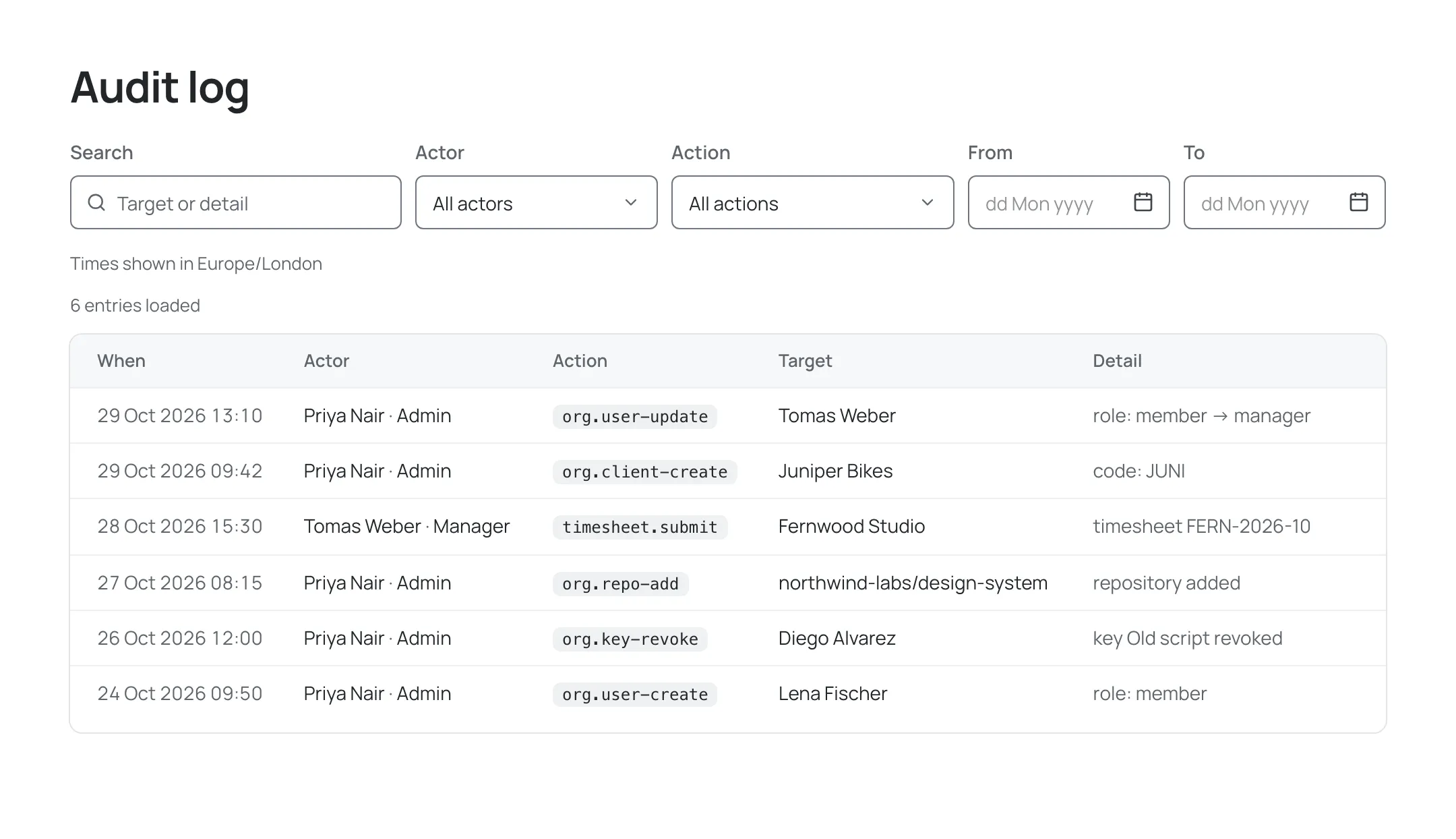
Each page of results holds up to 50 entries; choose Load more to show older entries. A line above the table counts what is shown, for example 50 entries loaded. If nothing has been recorded yet, the page says “No admin actions recorded yet.”
Filter the log
Section titled “Filter the log”The filter row above the table narrows the list. Filters can be combined, and they are kept in the page’s address, so you can bookmark or share a filtered view.
| Filter | What it does |
|---|---|
| Search | Finds entries whose Target or actor contains the text you type, or whose action matches it. Older entries are also matched on their Detail text. |
| Actor | Shows only the actions of one person. Choose All actors to clear it. |
| Action | Shows only one kind of action, such as timesheet.approve. Choose All actions to clear it. |
| From and To | Limit the list to a range of days. Both days are included. If To is before From, the page says To must be on or after From. |
Choose Clear filters to remove them all. If nothing matches, the page says No entries match these filters.
Which timezone the times use
Section titled “Which timezone the times use”Audit entries are stored in UTC and shown in your own timezone: the one saved on your Profile, or, if you have not saved one, the timezone your browser reports. A line above the table names it, for example Times shown in Europe/London. The From and To filters use the same timezone, so a day in the filter is the same day you see in the When column.
What the log protects
Section titled “What the log protects”Nobody can edit audit entries in ChronoTab. Entries written on or after 26 October 2026 are kept for one year, and older entries for 180 days; after that they are removed. Entries store people and records by reference, not by name: names and descriptions are looked up when you open the log, so if a person’s identity has been anonymised, the log shows them as anonymised. Treat the log as a history to review, not a live alerting tool — it does not notify anyone when an action happens.
The audit archive
Section titled “The audit archive”Each day, ChronoTab copies the previous day’s audit entries to a separate archive. Your organisation’s entries are encrypted with a key that belongs to your organisation alone, and each day’s copies are listed in a signed record, so a later change to them can be detected. The archive is locked against change: ChronoTab cannot overwrite or delete a copy before its retention period ends. Copies are kept for up to three years and then expire.
The archive holds the same references as the log, and no names, email addresses or text that people typed. Entries written before 26 October 2026 are not archived.
You cannot browse the archive in ChronoTab. An org admin can ask for an extract of the organisation’s archive by writing to support@chronotab.com; the extract lists entries as they were stored, with internal identifiers rather than names. If your organisation is deleted, its archive key is destroyed with the rest of its data, so its archived copies can no longer be read.
Next steps
Section titled “Next steps”- See which actions are admin-only on Roles and permissions.
- Manage members and their roles in Members and roles.
- Manage organisation keys in Organisation API keys.
Need help? Email support@chronotab.com.